About Azure AI Document Intelligence
Azure AI Document Intelligence is Microsoft's managed document-processing service for turning forms and business documents into structured data. It can extract printed and handwritten text, tables, layout, key-value information and typed fields, and it supports both Microsoft-built models and custom models trained for an organization's own document types. The service is aimed at teams building invoice processing, receipt capture, identity-document workflows, contract extraction, document search, compliance automation and other applications where data needs to move from documents into business systems.
What is included
Models
| General extraction | Read and Layout models for text, handwriting, tables and document structure |
|---|---|
| Prebuilt extraction | Invoices, receipts, IDs, contracts, bank statements, tax forms and other supported business documents |
| Custom extraction | Custom template, custom neural, composed models and custom classifiers |
API
| Recommended version | 2024-11-30 v4.0 GA for new development |
|---|
Limits
| Standard document size | Up to 500 MB per document |
|---|---|
| Standard analysis pages | Up to 2,000 pages per analyzed document |
| Default Standard analyze throughput | 15 transactions per second; quota increase can be requested |
Pricing
| Free allowance | F0 includes up to 500 pages per month |
|---|
Security
| Analysis data retention | Submitted input and analyze results are automatically deleted 24 hours after completion |
|---|
Deployment
| Developer access | REST API plus C#, Python, Java and JavaScript SDKs |
|---|
What can Azure AI Document Intelligence extract?
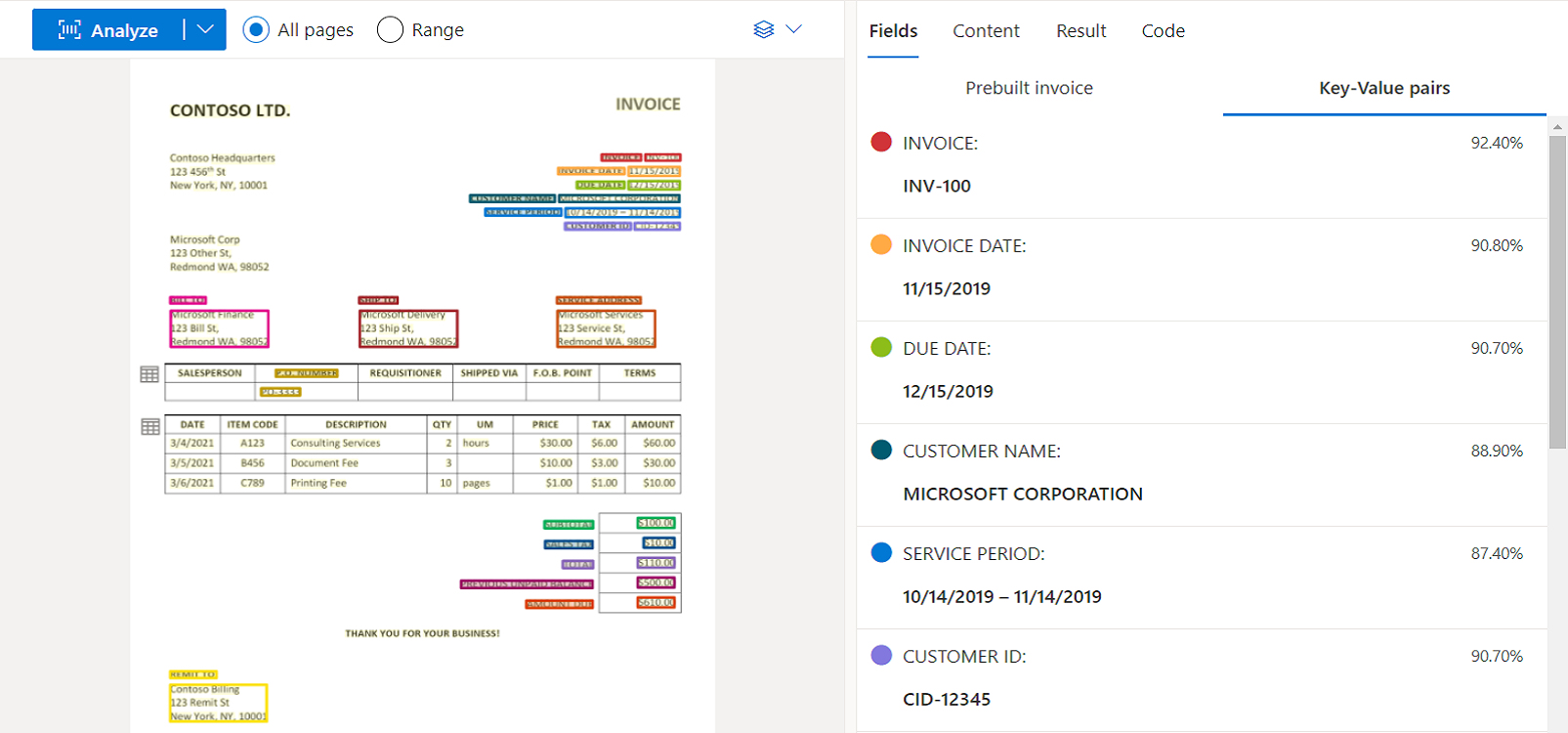
Microsoft's current v4.0 documentation separates general document analysis from prebuilt and custom models. The Read model extracts printed and handwritten text. Layout adds tables and document structure. Prebuilt models cover common business documents such as invoices, receipts, contracts, identity documents, health insurance cards, bank statements and multiple US tax and mortgage forms. The API returns strongly typed values for supported fields, such as dates, numbers, currency and addresses, which can reduce the amount of normalization an application has to perform after extraction.
Optional capabilities include high-resolution OCR, formula and font extraction, barcodes, searchable PDF output, query fields and key-value pairs. Teams should check model-specific support before assuming every add-on works with every document model.
When should a team use prebuilt models instead of custom models?
Prebuilt models are the simpler starting point when Microsoft's schema already matches the document being processed. Invoice and receipt models, for example, return known business fields without requiring a training dataset. This can shorten implementation time for common document types.
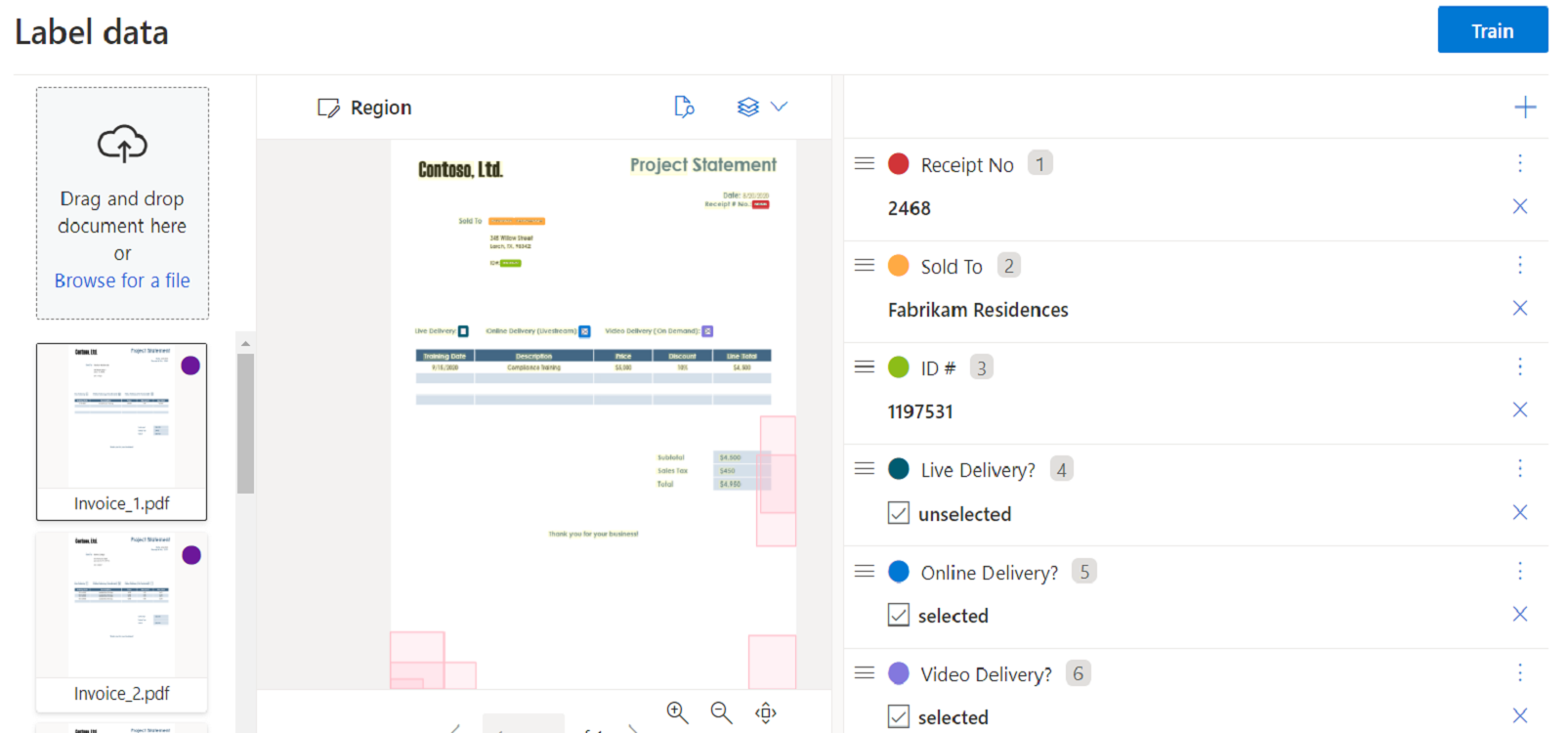
Custom models are better when the organization has its own forms, labels or field definitions. Custom template models suit documents with consistent layouts, while custom neural models are designed for more varied documents. Custom classifiers can identify document types before an extraction model is called. Organizations can also compose custom models when several related document layouts need to be handled through one workflow.
How does Azure AI Document Intelligence pricing work?
Pricing was checked on August 28, 2026. Microsoft bills Document Intelligence mainly by pages analyzed rather than by a fixed per-user subscription. The Free F0 tier includes up to 500 pages per month and is intended for evaluation. Standard S0 uses page-based pay-as-you-go pricing for Read, prebuilt models, custom extraction, classification and other capabilities, with separate meters for some add-ons and training. Microsoft also offers commitment tiers for higher-volume workloads.
The public pricing page does not expose one universal dollar amount for every region and agreement, so buyers should calculate cost using their Azure region, model mix, page volume, training needs and any premium add-ons. A document request can also process a page range, which matters because billing is based on analyzed pages.
What service limits matter in production?
Microsoft's current v4.0 service limits list a 4 MB maximum document size and 2 analyzed pages on Free F0, compared with 500 MB and up to 2,000 analyzed pages on Standard S0. Default analyze throughput is 1 transaction per second on F0 and 15 per second on S0. Standard throughput can be increased through quota requests, while the Free limits are fixed.
Custom-model limits also matter. The current service documentation lists up to 5,000 custom template models and 500 custom neural models on S0, a 1 GB neural training dataset limit, and up to 50,000 training pages for neural models. Teams planning large ingestion pipelines should design for asynchronous processing, throttling responses and retry behavior rather than assuming every request will run immediately at peak load.
Which API version should new projects use?
Microsoft recommends Azure Document Intelligence REST API 2024-11-30 v4.0 for new development. The v2.1 REST API reaches end of support on September 15, 2027, and the 2022-08-31 v3.0 API reaches end of support on March 30, 2029. Existing applications on older versions should plan migration rather than building new dependencies on retiring APIs.
Version 4.0 is generally available and includes newer batch-processing capabilities. Microsoft's March 2026 release notes also show continued updates to prebuilt tax-form models, which is a useful signal that supported extraction schemas can evolve and should be tested when applications depend on specific fields.
How can developers integrate the service?
Developers can call Document Intelligence through REST APIs or supported client SDKs including C#, Python, Java and JavaScript. Document Intelligence Studio provides a visual environment for testing prebuilt models, labeling data and working with custom models before application integration.
The service can also fit into broader Azure workflows. Extracted JSON can be sent to databases, queues, search indexes, automation tools or business applications. Integration design should keep the document-processing step separate from downstream approval and validation logic, because extraction confidence and field completeness still need application-specific handling for important financial, legal or identity workflows.
What should buyers know about privacy and security?
Microsoft states that Document Intelligence processes incoming data in the same region where the resource was created and temporarily stores submitted data and extracted results in Azure Storage. The current privacy documentation says input data and analysis results are automatically deleted 24 hours after an analysis operation completes, and the Delete Analyze Result API can be used to remove them earlier.
Requests are authenticated with the customer's service credentials, and Microsoft documents HTTPS transport and TLS requirements for the endpoints. Custom-model training data remains in customer-controlled Azure Blob Storage, while trained custom models are stored in Azure storage in the same region and logically isolated using the customer's subscription and credentials. Buyers handling regulated documents should still review regional availability, access controls, retention requirements and their own compliance obligations.
How does Document Intelligence differ from Azure Content Understanding?
Microsoft now positions the two services as complementary rather than interchangeable. Azure Document Intelligence focuses on accurate, deterministic extraction from structured and semi-structured documents. Azure Content Understanding adds LLM-powered analyzers for more complex unstructured and multimodal content.
Choose Document Intelligence when the main requirement is repeatable OCR, layout analysis, known business-document schemas or custom field extraction. Consider Content Understanding when the task needs deeper semantic interpretation across complex documents or multiple media types. Keeping these use cases separate also avoids paying for a more complex analysis path when straightforward structured extraction is enough.
What are the main limitations and migration considerations?
Document Intelligence is not a complete document-management or workflow product. It extracts and classifies information, but applications still need storage, business rules, exception handling, human review and downstream system integration. Accuracy can vary with scan quality, handwriting, layout complexity, language and document variation, so high-risk decisions should not rely on extraction without validation.
Container support also varies by model and API version. Microsoft has released v4.0 Read and Layout containers, but buyers with strict on-premises requirements should verify whether the exact model they need is available as a container before committing to an architecture. Older Form Recognizer and Document Intelligence API versions also have retirement dates, so migration planning belongs in the deployment design.
Who should choose something else?
A team that only needs basic OCR for a small number of files may find a simpler OCR library or an existing application feature easier to operate. Organizations that need full document storage, records management, approvals or case workflows should compare dedicated document-management and process-automation platforms rather than treating Document Intelligence as the whole solution.
Teams whose primary need is semantic reasoning over long, highly unstructured or multimodal content should compare Azure Content Understanding. Workloads that already have clean structured data should avoid document extraction entirely and integrate with the original system or API when possible. The strongest fit for Document Intelligence is when documents are genuinely the source of record and reliable structured extraction removes manual data-entry work.
Reviews
No reviews yet
Nobody has reviewed Azure AI Document Intelligence here yet.