About Azure Virtual Network Manager
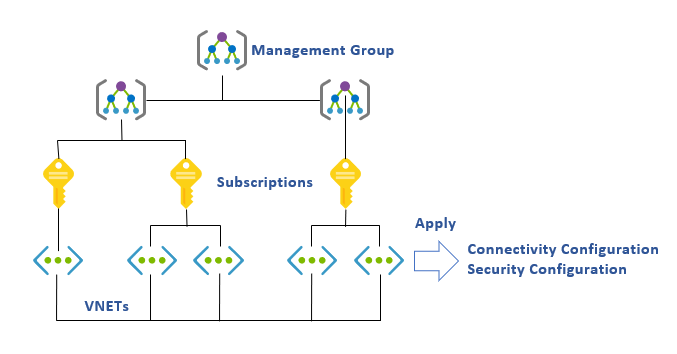
Azure Virtual Network Manager is Microsoft's centralized Azure service for managing virtual networks at scale across subscriptions, management groups, regions, and supported tenant scopes. It is designed for platform and network teams that need consistent connectivity, security, routing, IP address management, and network troubleshooting without configuring every virtual network separately. Teams define the manager's scope, place virtual networks into network groups, create approved configurations, and deploy those configurations to selected regions. This makes the service most valuable when Azure networking has grown beyond a small set of manually managed peerings, route tables, and security rules.
What is included
Management
| Management scope | Subscriptions and management groups, with documented cross-tenant limitations |
|---|
Connectivity
| Topology options | Mesh and hub-and-spoke connectivity configurations |
|---|
Scale
| Connected group size | 250 VNets by default, 1,000 by request, up to 5,000 with supported high-scale preview |
|---|---|
| Private endpoints per connected group | 2,000 by default, up to 20,000 with high-scale private endpoints enabled |
Security
| Security model | Security admin rules evaluated before network security group rules |
|---|
Routing
| Routing management | Centralized user-defined route configuration and deployment |
|---|
IP management
| IPAM | Centralized IP address pools with non-overlapping allocation support and current removal limitations |
|---|
Reliability
| Home-region behavior | Zone-redundant where supported; manager operations pause during home-region outage while deployed configs remain applied |
|---|
Operations
| Deployment model | Configurations are deployed to selected Azure regions before taking effect |
|---|
What does Azure Virtual Network Manager manage?
Azure Virtual Network Manager manages groups of Azure virtual networks rather than replacing the virtual networks themselves. A network manager receives delegated access over selected subscriptions or management groups. Within that scope, administrators can build network groups manually or use Azure Policy conditions to make membership dynamic.
Microsoft currently documents three main configuration types: connectivity, security admin, and routing. Connectivity configurations create mesh or hub-and-spoke topologies. Security admin configurations apply centrally governed rules before network security group evaluation. Routing configurations let platform teams describe and deploy user-defined routes at scale. The service also includes centralized IP address management and reachability verification capabilities.
How do network groups and connectivity configurations work?
Network groups are the targeting layer for Azure Virtual Network Manager. Teams can add virtual networks manually or use Azure Policy to include them based on conditions. This is useful when new workload networks are created frequently and should inherit the intended topology or security baseline without a separate peering task every time.
Connectivity configurations support mesh and hub-and-spoke designs. Regional mesh connects participating virtual networks within a region, while global mesh can extend connected-group communication across regions. Hub-and-spoke can establish spoke-to-hub connectivity and can optionally enable direct connectivity between spokes in the same spoke network group. Microsoft also states that existing manual peerings can coexist during migration, which lets teams move toward centralized management without requiring a single cutover event.
How do security admin rules differ from network security groups?
Security admin rules are an organization-level control layer that is evaluated before network security group rules. A deny security admin rule can block traffic before NSG processing, which lets a central security or networking team enforce restrictions that workload teams cannot override locally.
This is useful for organization-wide guardrails such as blocking risky ports or enforcing common network restrictions. It does not make NSGs unnecessary. NSGs still provide workload-level filtering, while security admin rules are better suited to centrally enforced policy across many virtual networks. Buyers should plan rule ownership carefully so central controls remain understandable and do not conflict with application-level troubleshooting.
What are the current scale limits?
Microsoft's current limits include several important 2026 changes. A connected group supports up to 250 virtual networks by default. That soft limit can be raised to 1,000 through Microsoft's request process. In supported regions, Microsoft also documents an AllowHighScaleConnectedGroup preview feature that can increase one connected group to as many as 5,000 virtual networks.
A connected group supports up to 2,000 private endpoints by default. Microsoft now documents a high-scale private endpoint option that can increase this to 20,000. A hub-and-spoke connectivity configuration can peer up to 1,000 spoke virtual networks with a hub. Security admin rules are limited to 20,000 IP prefixes combined and 100 admin rules at one Azure Virtual Network Manager level. Policy assignments also have a documented management-group constraint below 15,000 subscriptions.
These figures are service limits, not a guarantee that every topology should be designed near the ceiling. Very large environments should validate region support, preview dependencies, route behavior, operational ownership, and failure domains before adopting a high-scale design.
How does Azure Virtual Network Manager pricing work?
Pricing was checked on September 3, 2026. Microsoft states that new Azure Virtual Network Manager instances use virtual-network-based pricing. Instances created before the newer pricing model can remain on the previous subscription-based model until its retirement. Microsoft says subscription-based pricing was announced for retirement to existing customers on February 6, 2025 and will retire fully on February 6, 2028. Remaining instances still using that model then move automatically to virtual-network-based pricing.
The exact charge depends on the features and virtual networks being managed, and Microsoft directs customers to the Azure pricing calculator for their billing context. Connectivity created through Virtual Network Manager can also incur normal virtual network peering data-transfer charges. Microsoft states that peerings already created outside Virtual Network Manager are not double charged simply because the manager also sees or migrates those connections.
What reliability behavior should buyers understand?
Azure Virtual Network Manager is automatically zone-redundant when deployed in an Azure region that supports availability zones, and Microsoft manages that zone redundancy for the service. However, the manager instance itself is a single-region resource.
Microsoft states that if the home region of the manager becomes unavailable, management operations fail until that region recovers. Configurations that were already deployed to managed virtual networks in other regions remain intact and continue to apply during that outage. This distinction matters for enterprise planning: the control plane can become temporarily unavailable even though previously deployed connectivity and security configurations continue operating. Teams should therefore avoid treating the manager resource as a globally writable control plane during a regional outage.
What limitations matter for IP address management and connected groups?
Azure Virtual Network Manager includes centralized IP address management so teams can allocate non-overlapping address space from IP pools. Microsoft currently documents an important limitation: removing IPAM-managed address spaces from virtual networks or subnets is not supported, and removing IP address spaces from an IPAM pool is also not supported. Teams should therefore treat IPAM allocation as an architectural decision rather than a temporary label that can always be reversed later.
Connected groups also require careful address planning. Microsoft allows virtual networks with overlapping IP spaces in the same connected group, but communication to an overlapping IP address is dropped. Overlap can also create inaccessible address ranges when a connected-group member is peered to an external virtual network with conflicting space. For large estates, IPAM and address-plan governance should be in place before broad connected-group rollout.
How does Azure Virtual Network Manager compare with Virtual WAN and Route Server?
Azure Virtual Network Manager is mainly a centralized management and governance layer for Azure virtual networks. Azure Virtual WAN is a broader managed transit platform for branch, VPN, ExpressRoute, and multi-region hub connectivity. Azure Route Server focuses on BGP route exchange between Azure networks and network virtual appliances.
A large environment can use more than one of these services. Virtual Network Manager can govern network groups, security rules, routing configurations, and IP address space while Virtual WAN or other networking services handle specific connectivity patterns. Buyers should select the service that matches the operational problem instead of treating all Azure networking services as direct substitutes.
What deployment and migration issues should buyers plan for?
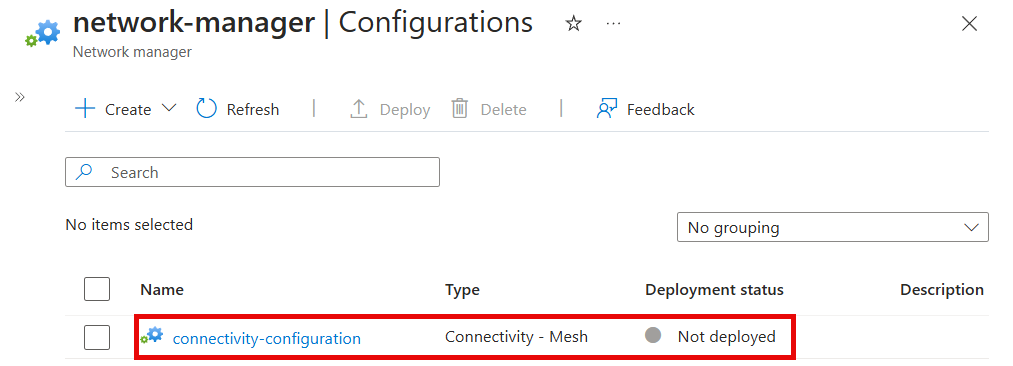
Configurations do not take effect merely because they are created. Microsoft requires connectivity, security, and routing configurations to be deployed to the target regions that contain the intended network resources. Teams should treat configuration deployment as a controlled network change, especially when one security or routing update can affect many subscriptions at once.
Cross-tenant support also has limitations, and Microsoft documents static membership requirements for supported cross-tenant network-group scenarios. Existing manual peerings can remain during migration, but teams should review the final topology for duplicate paths, unexpected route behavior, and security policy interactions. High-scale connected groups are also a preview capability, so production design should account for preview support terms and region availability rather than assuming the 5,000-VNet option is universally available.
Who should choose something else?
A small Azure environment with fewer than roughly 10 virtual networks in one subscription may not need another centralized network-management layer. Microsoft's own current networking design guidance says these smaller environments can often manage peering, NSG rules, and IP addresses manually without the added complexity of Azure Virtual Network Manager.
Organizations whose main problem is branch or hybrid connectivity should evaluate Azure Virtual WAN, VPN Gateway, or ExpressRoute. Teams that mainly need dynamic BGP exchange with network virtual appliances should evaluate Azure Route Server. Azure Virtual Network Manager is strongest when the hard problem is consistent topology, security, routing, and IP management across many Azure virtual networks, subscriptions, teams, or regions.
Reviews
No reviews yet
Nobody has reviewed Azure Virtual Network Manager here yet.