About Azure Network Watcher
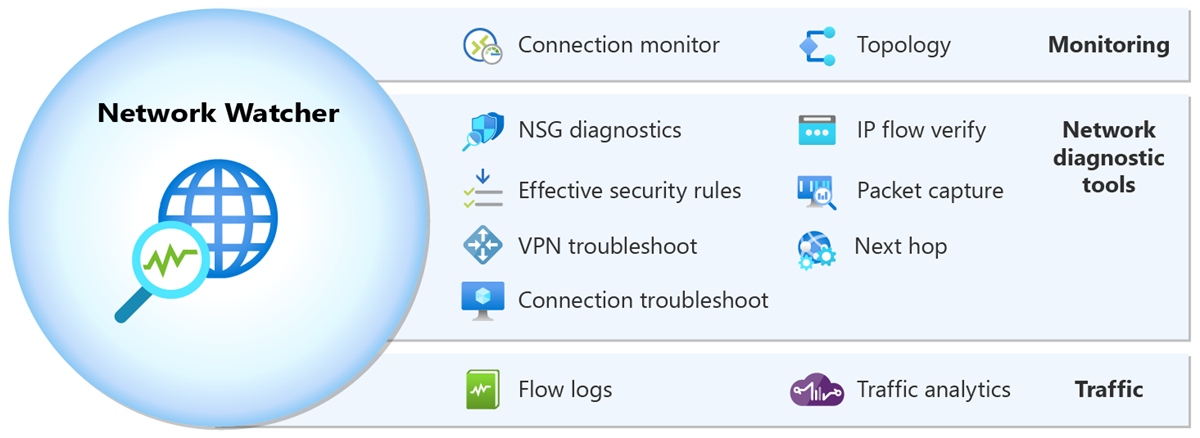
Azure Network Watcher is an Azure networking operations service for monitoring and troubleshooting Infrastructure-as-a-Service network resources. Microsoft positions it for virtual machines, virtual networks, application gateways, load balancers, VPN gateways and related Azure network paths rather than for PaaS application monitoring or web analytics. It combines topology and continuous connection monitoring with point-in-time diagnostic tools such as IP flow verify, NSG diagnostics, next hop, effective security rules, connection troubleshoot, packet capture and VPN troubleshoot. It also provides flow logging and traffic analytics for teams that need to understand how traffic is moving through an Azure environment.
What is included
Monitoring
| Topology | Interactive Azure network topology across supported subscriptions, resource groups and locations |
|---|---|
| Connection Monitor | Ongoing end-to-end connection monitoring for Azure and hybrid endpoints |
Diagnostics
| IP flow verify | Checks whether IPv4 or IPv6 traffic is allowed or denied and identifies the responsible security rule |
|---|---|
| Packet capture | Remote packet capture for Azure virtual machines and virtual machine scale sets |
| Routing | Next hop and connection troubleshooting tools for Azure network paths |
Traffic
| Flow logging | Virtual network flow logs with Azure Storage and optional analytics processing |
|---|---|
| Traffic Analytics | Visual analysis of flow-log data for network traffic patterns |
Scale
| Connection Monitor limit | Up to 100 connection monitors per region per subscription |
|---|
What problems does Azure Network Watcher solve?
Network Watcher is useful when a network team needs evidence about why Azure IaaS traffic is failing, taking an unexpected route or performing poorly. Topology maps Azure network resources and their relationships across subscriptions, resource groups and locations. Connection Monitor checks connectivity and network performance over time between supported Azure and hybrid endpoints.
For immediate troubleshooting, Network Watcher includes tools that answer narrower questions. IP flow verify reports whether traffic to or from a virtual machine is allowed or denied and identifies the security rule responsible. NSG diagnostics extends that type of analysis to virtual machines, virtual machine scale sets and application gateways. Next hop reports the routing decision for a destination, while effective security rules shows the combined network security rules that apply to a network interface and its subnet.
How do packet capture and connection troubleshooting work?
Packet capture lets administrators start remote packet capture sessions for Azure virtual machines and virtual machine scale sets. This is useful when routing and security-rule checks are not enough and the team needs packet-level evidence. Connection troubleshoot performs an on-demand connectivity test from supported Azure sources such as a virtual machine, virtual machine scale set, application gateway or Bastion host to a destination including another virtual machine, an FQDN, a URI or an IPv4 address.
The distinction matters when choosing a tool. Connection troubleshoot is a point-in-time test. Connection Monitor is designed for ongoing monitoring. Packet capture goes deeper by collecting traffic for later inspection, so it should be used deliberately because captures can contain operationally sensitive network data.
How do flow logs and Traffic Analytics fit in?
Network Watcher can collect flow information for Azure IP traffic and store it in Azure Storage. Microsoft currently supports virtual network flow logs and also documents the older network security group flow-log path. Buyers should not start a new design around NSG flow logs: Microsoft states that NSG flow logs retire on September 30, 2027, and new NSG flow-log creation is no longer supported. Microsoft recommends migrating to virtual network flow logs.
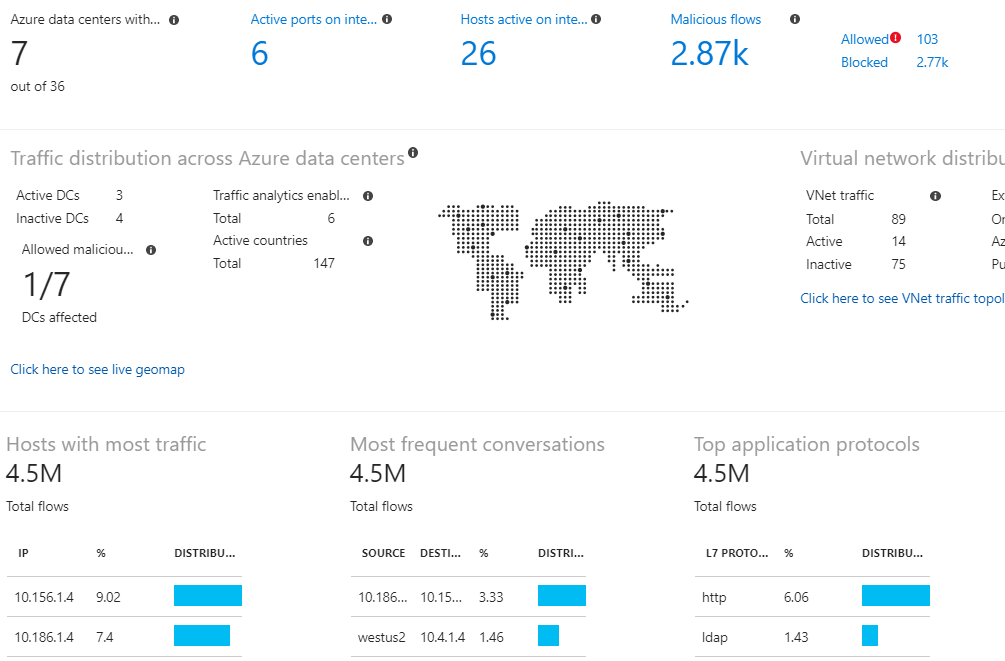
Traffic Analytics builds visualizations from flow-log data so teams can examine traffic distribution, conversations and network activity at a broader level. Storage, Log Analytics and related data-processing choices can add cost, so flow logging should be planned around retention, compliance and troubleshooting needs rather than enabled everywhere without a data-volume estimate.
What does Azure Network Watcher cost?
Pricing was checked on August 28, 2026 using Microsoft's current Azure Network Watcher pricing page. Microsoft includes free monthly allowances for several meters, including 5 GB of collected flow logs, 1,000 Network Diagnostic checks and 10 Connection Monitor tests. Usage above the included allowance is billed according to the applicable Network Watcher meter and billing context.
Microsoft's public pricing interface does not expose one universal dollar amount that applies to every agreement, currency and region, so this page does not invent a flat monthly price. Related services can also create charges. Flow logs can incur Azure Storage charges, Traffic Analytics uses its own processing meter, and some analytics scenarios involve Log Analytics or Event Hubs costs. Buyers should estimate the actual volume of checks, tests and flow data for the subscriptions they plan to monitor.
What limits should teams plan around?
Microsoft currently documents one Network Watcher instance per region per subscription. The service supports up to 100 Connection Monitors per region per subscription, with up to 20 test groups, 100 sources and destinations and 20 test configurations per Connection Monitor. Microsoft also documents up to 10,000 packet-capture sessions per region per subscription and one VPN troubleshoot operation at a time per subscription.
These limits are usually generous for ordinary environments, but centralized platform teams should include them in design reviews when many subscriptions, regions or large-scale monitoring configurations are involved. The Usage and quotas view can also summarize deployed networking resources and their limits, which is useful before a team reaches a regional resource ceiling.
How is Network Watcher enabled and deployed?
Microsoft automatically enables Network Watcher in a region when a virtual network is created or updated in that region, unless the subscription previously opted out of automatic enablement. Microsoft states that automatic enablement by itself does not affect resources or create a charge. Teams that disabled this behavior can enable Network Watcher manually when they need the service.
Operational ownership still matters. Network teams should decide who can run packet capture, change diagnostic settings, create connection monitors and access flow logs. Diagnostic data should be retained only as long as needed and placed in storage or analytics workspaces that follow the organization's access, residency and retention controls.
How does Network Watcher differ from Azure Monitor and Virtual Network Manager?
Network Watcher is the specialist troubleshooting and network-observability layer for Azure IaaS networking. Azure Monitor is broader observability infrastructure for metrics, logs, alerts and application or resource monitoring across many Azure services. The two can work together, but Azure Monitor should not be treated as a replacement for Network Watcher's routing, packet, NSG and connectivity diagnostics.
Azure Virtual Network Manager addresses centralized network grouping, topology policy, security-admin rules, routing and IP address management across many virtual networks. That is a governance and configuration problem. Network Watcher is the better fit when the question is whether traffic can get from one point to another, which route it takes, which security rule applies, or what the packets and flows actually show.
What are the main limitations?
Microsoft explicitly says Network Watcher is not intended for PaaS monitoring or web analytics. Some tools also depend on the type of Azure resource being tested, and flow-log or analytics features can require storage and monitoring resources outside the Network Watcher instance itself.
Network Watcher resources cannot be moved from one Azure region to another, although Microsoft says a Network Watcher resource can be moved between resource groups. Connection Monitor stores customer data in a single region to satisfy in-region data-residency requirements. Teams with strict residency, retention or cross-region operating requirements should review those behaviors before standardizing their monitoring design.
Who should choose something else?
Choose Azure Monitor when the main requirement is broad metrics, logs, alerts and application or infrastructure observability rather than Azure network-path troubleshooting. Choose Azure Virtual Network Manager when the problem is centrally applying connectivity, routing or security-admin configuration across a large virtual-network estate. Use Azure Firewall, Application Gateway, Front Door, DDoS Protection or a third-party network virtual appliance when the requirement is to enforce or inspect traffic rather than diagnose it.
Network Watcher is also a poor fit for teams looking for general website analytics, PaaS application-performance monitoring or end-user digital experience monitoring. Its strongest value is for engineers operating Azure IaaS networks who need a Microsoft-native way to verify traffic decisions, monitor connections, capture packets and inspect network flow behavior.
Reviews
No reviews yet
Nobody has reviewed Azure Network Watcher here yet.