About Azure Route Server
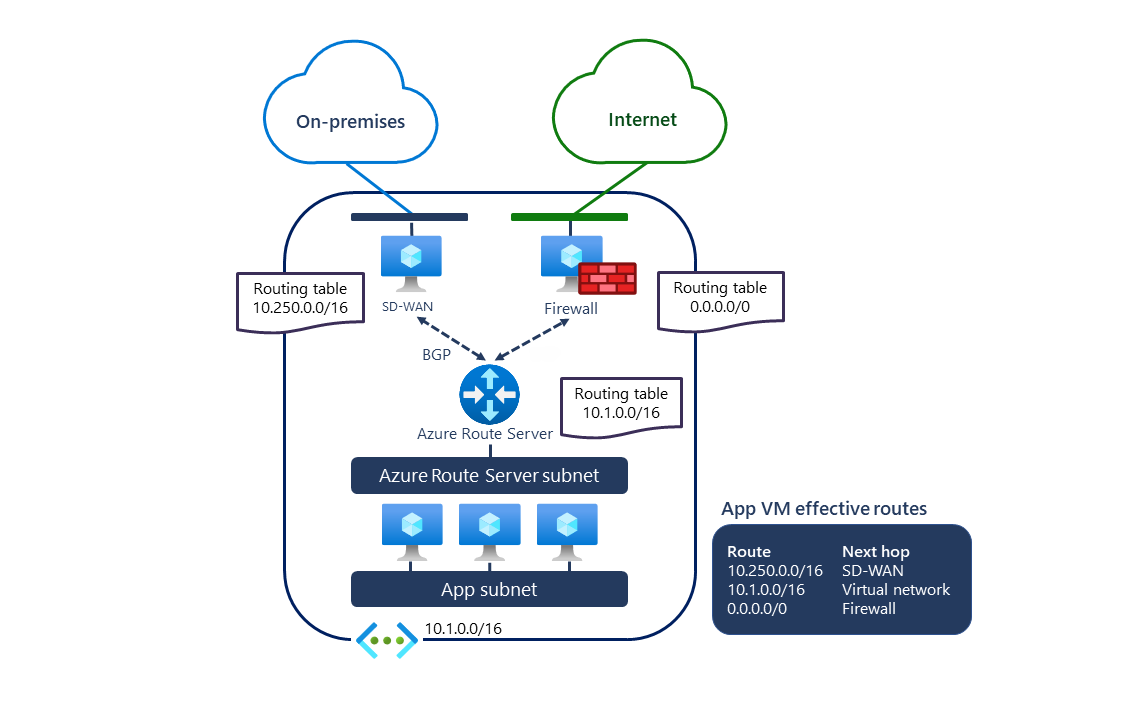
Azure Route Server is a managed Azure networking service for dynamic route exchange between Azure virtual networks and network virtual appliances that support Border Gateway Protocol. Instead of maintaining large sets of user-defined routes by hand, network teams can use Route Server to learn routes from appliances such as SD-WAN routers and firewalls and advertise Azure virtual network routes back to those appliances. It is most useful in hub-and-spoke and hybrid network designs where routes change over time and manual route-table updates would be difficult to operate reliably.
What is included
Routing
| Protocol | BGP route exchange between Azure networking and BGP-capable network virtual appliances |
|---|
Scale
| BGP peers | Up to 16 peers per Route Server deployment |
|---|---|
| Routes per BGP peer | Up to 4,000 advertised routes per peer |
| Virtual machines | Up to 50,000 VMs across the virtual network and peered virtual networks |
| Virtual networks | Up to 500 virtual networks |
| Total prefixes | Up to 10,000 on-premises and Azure virtual network prefixes |
Deployment
| Dedicated subnet | RouteServerSubnet, minimum /26 in current Microsoft deployment guidance |
|---|
Policy
| Route maps | Supports route filtering, aggregation, AS-PATH changes, and BGP community changes with documented constraints |
|---|
What does Azure Route Server do?
Azure Route Server acts as a managed BGP route reflector inside an Azure virtual network. Network virtual appliances establish BGP sessions with Route Server and advertise prefixes they can reach. Route Server then programs those learned routes into Azure networking so workloads can use them without administrators creating a separate user-defined route for every destination. Route Server also advertises Azure virtual network prefixes back to the appliances.
This makes it useful when organizations run SD-WAN appliances, security appliances, or other BGP-capable network virtual appliances in Azure. It can also integrate with ExpressRoute and VPN gateways for hybrid routing scenarios where on-premises, branch, and Azure routes need to be exchanged dynamically.
How does BGP peering work with Azure Route Server?
A Route Server deployment uses a dedicated subnet named RouteServerSubnet and peers with network virtual appliances through BGP. Microsoft currently supports up to 16 BGP peers per Route Server deployment. Each peer can advertise up to 4,000 routes to Route Server; if a peer exceeds the documented limit, Microsoft states that the BGP session can be dropped.
Route Server supports public or private autonomous system numbers on customer appliances except for ASNs reserved by Azure or IANA. Teams should plan peer ASNs, route advertisements, and failover behavior before deployment so that route changes do not create loops, black holes, or unintended paths.
What are the current Azure Route Server scale limits?
Microsoft currently documents support for up to 50,000 virtual machines across the Route Server virtual network and peered virtual networks, up to 500 virtual networks, and up to 10,000 total on-premises and Azure virtual network prefixes. When branch-to-branch exchange with ExpressRoute is enabled, the total routes advertised toward the ExpressRoute circuit from the virtual network address space and Route Server must stay within the documented ExpressRoute route limit.
These limits are high enough for many hub-and-spoke environments, but route scale still needs active capacity planning. Large estates should monitor the number of learned routes, peer sessions, peered networks, and the route limits of connected ExpressRoute or VPN components rather than assuming Route Server removes every routing constraint.
What are route maps and when should they be used?
Route maps let network teams control how Route Server handles route advertisements. Microsoft currently supports route-map actions for filtering or aggregating routes and modifying selected BGP attributes such as AS-PATH and BGP communities. This can help implement routing policy without pushing all logic into each individual network appliance.
Route maps also add design constraints. Microsoft notes that summarization removes AS-PATH and community attributes from summarized routes, route maps support only 2-byte ASN values for the documented AS prepend behavior, and Azure-reserved communities or ASNs must not be removed or reused incorrectly. The first route-map deployment on a Route Server can also trigger an upgrade that takes about 30 minutes, so production changes should be planned and validated.
How does Azure Route Server pricing work?
Pricing was checked on August 27, 2026. Microsoft currently bills Azure Route Server primarily by deployment time through hourly infrastructure units. Additional hourly meters can apply when route maps are deployed and when route maps are applied to network virtual appliance, VPN, or ExpressRoute connections. Microsoft also documents connection-based units for site-to-site VPN and ExpressRoute scenarios on the latest software version.
The Azure Route Server overview states that the base service does not charge separately for routes processed or for BGP sessions maintained. Exact rates depend on billing region, agreement, and currency, so buyers should use Microsoft's current pricing page or calculator instead of treating one example price as universal. Connected products such as ExpressRoute, VPN Gateway, network virtual appliances, public IP addresses, and data transfer can have separate charges.
What should buyers know about deployment and operations?
A Route Server can be deployed only once in a virtual network and must use a dedicated RouteServerSubnet. Microsoft currently requires that subnet to be at least /26 for standard deployment guidance. Microsoft also states that network security groups and user-defined routes are not supported on the RouteServerSubnet.
Route Server is a control-plane routing service, not a data-path appliance. It does not inspect or forward application packets between network virtual appliances and workloads. Traffic still flows through the selected next-hop appliances and Azure network paths. This distinction matters for troubleshooting because a healthy BGP session does not automatically prove that an NVA, firewall policy, IP forwarding configuration, or return route is correct.
How does Route Server compare with Virtual WAN and manual route tables?
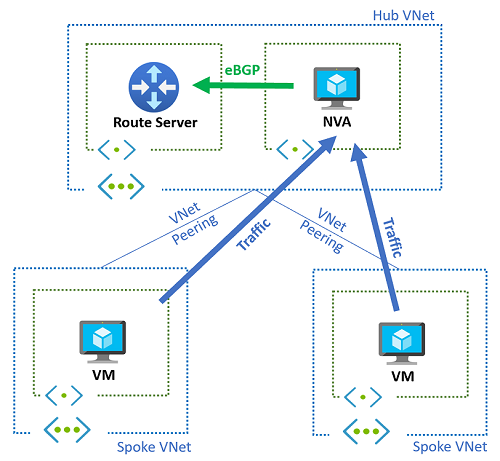
Route Server is a focused choice when an organization already has a virtual network topology and wants dynamic BGP exchange with network virtual appliances. It can reduce the operational burden of maintaining user-defined routes in hub-and-spoke networks while allowing teams to keep their existing NVA architecture.
Azure Virtual WAN is broader. It provides managed virtual hubs, branch connectivity, routing, VPN, ExpressRoute, and optional security integration as part of a larger WAN architecture. Manual route tables can still be simpler for small static environments with only a few predictable routes. The right choice depends on whether the network needs dynamic route learning, centralized managed WAN services, or only a small number of static paths.
Who should choose something else?
Organizations should choose something else when they do not run BGP-capable network virtual appliances, have only a few static routes, or want a more complete managed branch and global transit platform. In those cases, standard route tables, Azure Virtual WAN, VPN Gateway, ExpressRoute, or Azure Firewall routing may solve the requirement with less routing complexity.
Route Server is also not a replacement for a firewall, load balancer, VPN endpoint, or ExpressRoute circuit. It exchanges routing information; it does not provide traffic inspection, application delivery, encryption, or private circuit connectivity by itself. Buyers should use it when dynamic routing is the actual operational problem, not simply because the environment contains multiple Azure networks.
Reviews
No reviews yet
Nobody has reviewed Azure Route Server here yet.