About Azure Data Explorer
Azure Data Explorer is a fully managed analytics service for high-volume logs, telemetry, time-series data, IoT events, and other fast-moving datasets that need interactive analysis. It uses Kusto Query Language (KQL) and is designed for workloads where teams need to ingest large volumes quickly, keep recent data available for fast exploration, and query structured, semi-structured, and unstructured records without building a traditional data warehouse first. It is best understood as an analytics engine for operational and exploratory data rather than as a transaction database or a replacement for every warehouse workload.
What is included
Analytics
| Primary query language | Kusto Query Language (KQL) |
|---|---|
| Workload fit | Logs, telemetry, time series, IoT, exploratory analytics |
Scale
| Databases per cluster | Up to 10,000 under current documented limits |
|---|---|
| Instances per cluster | Up to 1,000 under current documented limits |
| Clusters per region per subscription | 20 by default under current documented limits |
Networking
| Private connectivity | Azure Private Link private endpoints supported |
|---|
Operations
| Autoscaling | Optimized Autoscale supported |
|---|
Pricing
| Billing model | VM compute plus Azure Data Explorer markup, storage, and networking; Developer tier has no Data Explorer markup |
|---|
What is Azure Data Explorer best used for?
Azure Data Explorer is a strong fit for log analytics, application and infrastructure telemetry, IoT data, time-series analysis, security and operations data, clickstreams, and other event-heavy workloads. Microsoft describes the service as capable of ingesting terabytes of data in minutes and querying petabyte-scale datasets with interactive response times that can range from milliseconds to seconds depending on the workload.
The service is especially useful when incoming data has high velocity, varied schemas, or a need for fast investigation. KQL supports filtering, aggregation, joins, text parsing, time-series functions, geospatial functions, anomaly detection, forecasting, cross-database queries, and cross-cluster queries. Teams can query from the Azure Data Explorer web experience, SDKs, or REST APIs.
How are clusters, databases, tables, and ingestion organized?
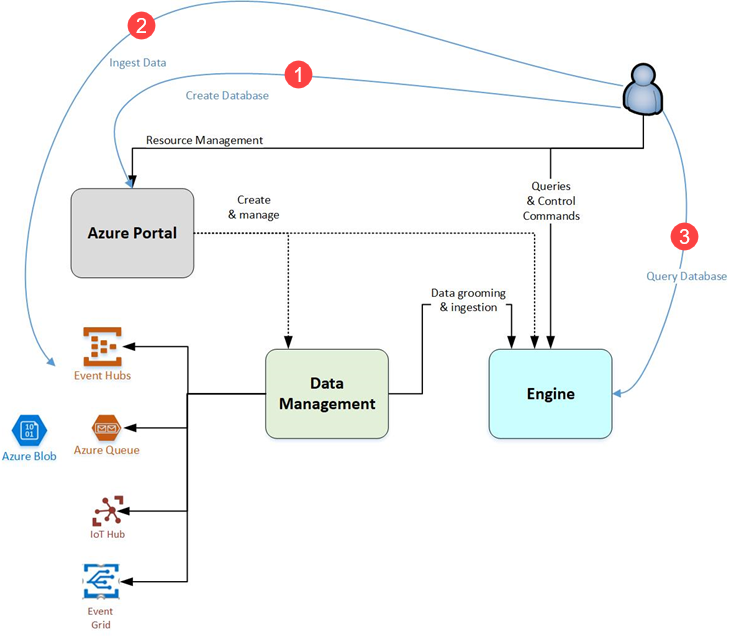
A full Azure Data Explorer deployment uses a cluster that contains one or more databases. Databases contain tables, and Azure Data Explorer stores table data in shards that Microsoft calls extents. Data is indexed and partitioned for analytics use rather than for transactional row-by-row application updates.
Microsoft currently documents up to 10,000 databases in a cluster and up to 10,000 tables in each database. A subscription can have 20 clusters per region by default, and a cluster can scale to as many as 1,000 instances under the documented service limits. Higher cluster or database limits can require an Azure support request.
How does ingestion work?
Azure Data Explorer supports queued ingestion and streaming ingestion, plus integrations and connectors for services such as Azure Event Hubs, Azure Storage, and other ingestion pipelines. The built-in get data experience can help create tables and mappings for one-time or continuous ingestion.
Teams can also use update policies, materialized views, stored functions, and continuous export to shape data after ingestion or move results to Azure Data Lake Storage. These tools are useful for high-volume operational analytics, but they also mean teams should plan retention, hot-cache policy, ingestion mappings, and downstream export before a large production rollout.
What is the role of Kusto Query Language?
Kusto Query Language is the primary query language for Azure Data Explorer. Microsoft created KQL for interactive exploration of large telemetry and event datasets, and the language is now also used across other Microsoft services such as Azure Monitor Logs and Application Insights.
KQL is well suited to filtering, aggregation, parsing JSON or XML-like content, joins, unions, time-series operations, pattern analysis, and anomaly detection. Azure Data Explorer also supports a T-SQL query endpoint for selected SQL-compatible scenarios, but KQL remains the native model and is the language teams should expect to learn for deeper use.
How does scaling and autoscale work?
Azure Data Explorer separates the analytics engine from durable storage. Production clusters use compute instances selected from compute-optimized or storage-optimized families, and teams can scale the instance count as workload changes. Microsoft also provides Optimized Autoscale, which evaluates signals such as CPU, ingestion load, cache utilization, and query patterns to adjust cluster capacity within configured boundaries.
Autoscale can reduce overprovisioning, but it does not remove the need to size for query concurrency, ingestion peaks, hot-cache requirements, and regional capacity. Microsoft also uses Azure Advisor recommendations to suggest more cost-effective SKUs, cache policy changes, and autoscale settings based on observed usage.
How does Azure Data Explorer pricing work?
Pricing was checked on August 28, 2026. Azure Data Explorer does not have one universal monthly price. A paid cluster normally combines the underlying Azure virtual machine cost with an Azure Data Explorer service markup, plus storage and network charges where applicable. Microsoft also offers one-year and three-year reservation options for eligible configurations.
The current pricing page states that the Azure Data Explorer markup is not charged for Developer tier clusters. Developer tier is intended for development and testing, does not provide an SLA, and should not be treated as a production tier. Microsoft also states that when a full cluster is stopped, compute resources and the Data Explorer compute markup stop billing while retained storage continues to incur charges. Exact rates depend on region, currency, agreement, VM family, capacity, and storage choices.
What security and network controls are available?
Azure Data Explorer supports Microsoft Entra identity, role-based access controls, database-level permissions, private endpoints, and public-access restrictions. Private endpoints use Azure Private Link so clients can reach the cluster with private IP addresses over the Microsoft backbone instead of exposing the query path to the public internet.
Managed private endpoints can also let Azure Data Explorer reach protected services such as Azure Event Hubs, Azure Storage, Azure SQL, Azure Digital Twins, or another Azure Data Explorer cluster. Microsoft recommends managed identity for supported Storage and Event Hubs scenarios where that design is sufficient. Private endpoint resources can add separate Azure Private Link costs.
What are the important service limits?
Microsoft currently documents a default maximum of 20 Azure Data Explorer clusters per region per subscription, up to 1,000 instances per cluster, and up to 10,000 databases per cluster. The recommended maximum number of extents per cluster is 10 million, and a leader cluster can have up to 100 follower clusters under the documented data-sharing limits.
Management operations are also rate limited. Microsoft currently documents up to 500 cluster read operations per five minutes and 1,000 cluster write operations per hour. These are platform limits, not performance guarantees, and actual query and ingestion design still depends on SKU, instance count, cache policy, data shape, and workload concurrency.
How does Azure Data Explorer compare with Azure Monitor, Synapse, and databases?
Azure Data Explorer is closely related to KQL-based monitoring experiences, but it is a standalone analytics platform where customers manage their own clusters, databases, ingestion, retention, and query workloads. Azure Monitor Logs is usually the better starting point when the main goal is Azure resource and application observability rather than a broader custom analytics platform.
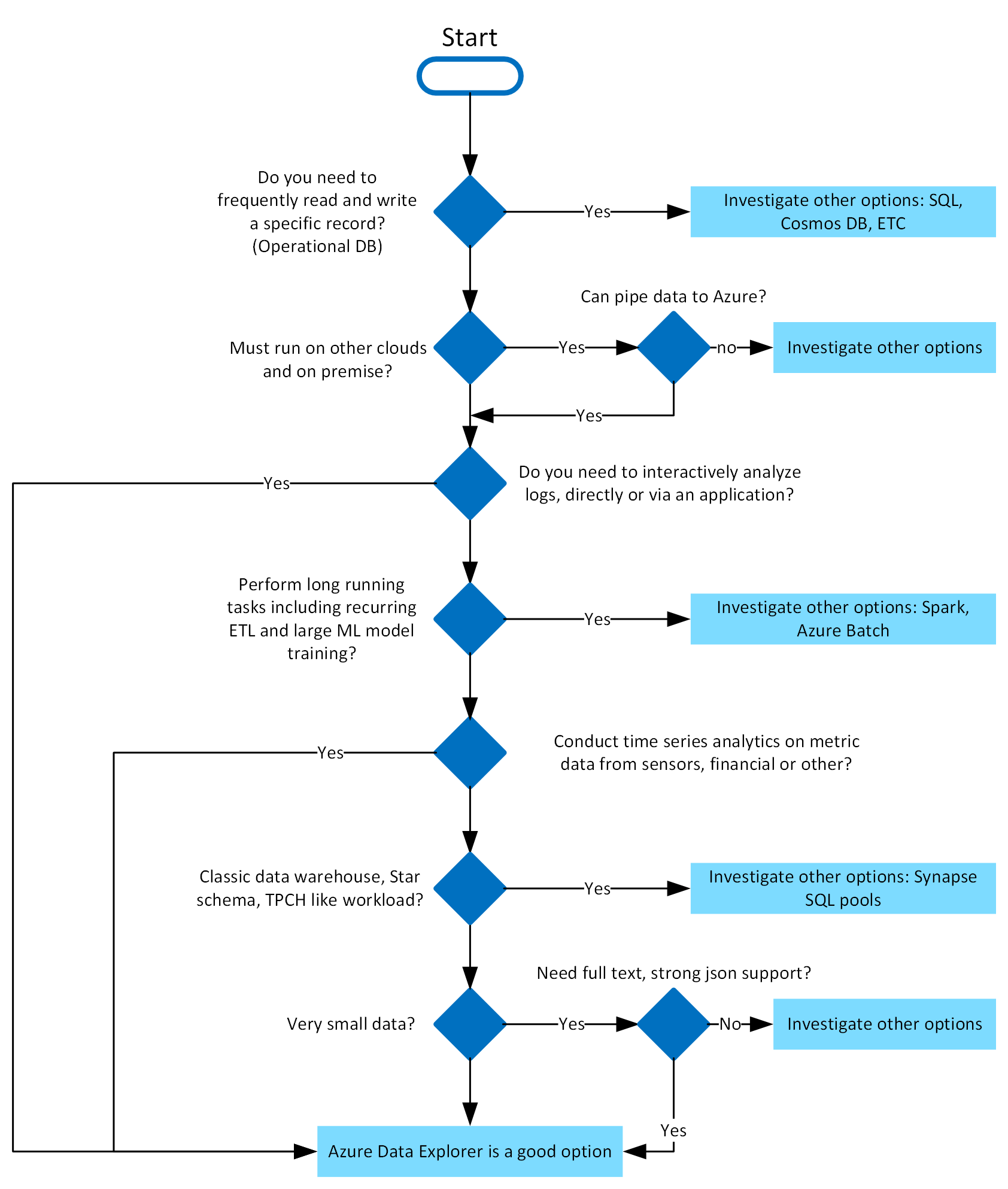
Azure Synapse Analytics is a different fit when teams need warehouse-style SQL analytics, Spark, and integrated data engineering. Azure SQL Database or Azure Database for PostgreSQL are better choices for transactional application data that needs frequent record updates, relational constraints, and normal operational database behavior. Azure Cosmos DB is a better fit for distributed application serving patterns rather than exploratory analytics over large event histories.
What limitations should buyers plan for?
Azure Data Explorer is not a general-purpose transaction database. It is optimized for analytical ingestion and query rather than high-frequency point updates to individual business records. Teams also need KQL skills, thoughtful retention and hot-cache settings, and cost controls around always-on production compute.
Private endpoints, network design, ingestion dependencies, and multi-region architecture can add complexity. Stopping a cluster reduces compute cost but makes data unavailable for queries and prevents new ingestion until the cluster is restarted. Restarting can take time, and hot-cache contents need to warm again. Regional SKU availability and quota also need to be confirmed for production sizing.
Who should choose something else?
Choose another service when the primary requirement is transactional application storage, a classic SQL warehouse, a managed log workspace for Azure observability, or long-running Spark-style data engineering. Azure SQL Database or PostgreSQL fit transactional workloads better, Azure Monitor Logs fits many operational monitoring cases with less cluster administration, and Synapse or Microsoft Fabric can be stronger when the architecture centers on warehouse and broader analytics workflows.
Azure Data Explorer is most compelling when the workload is dominated by large volumes of event, telemetry, log, time-series, or semi-structured data and teams need fast interactive KQL analysis. If those characteristics are not central to the workload, the operational and cost model of a dedicated Data Explorer cluster may be unnecessary.
Reviews
No reviews yet
Nobody has reviewed Azure Data Explorer here yet.