
About Chrome Enterprise
Chrome Enterprise is Google's management and security layer for organizations that standardize on Chrome browser. It is not a separate browser: the core product adds centralized policy, reporting, extension control and browser enrollment, while Chrome Enterprise Premium adds paid security capabilities on top. This page focuses on IT administration, security, pricing and deployment rather than repeating consumer Chrome features.
What it does
Management
| Chrome Enterprise Core | Cloud-based Chrome browser management through Google Admin console at no additional cost |
|---|---|
| Policy controls | More than 100 Chrome policies, including extension, browser and access controls |
Reporting
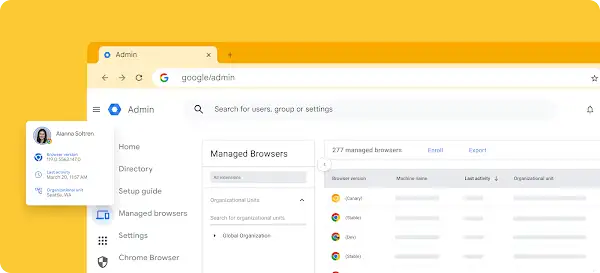
| Managed browser visibility | Browser version, installed extensions, applied policies and enrollment information |
|---|
Security
| Chrome Enterprise Premium | Paid browser security layer for advanced data protection and threat visibility |
|---|
Pricing
| Premium list price | $6 per user per month, checked August 23, 2026 |
|---|
What is included in Chrome Enterprise Core?
Chrome Enterprise Core lets administrators manage Chrome from the Google Admin console across Windows, macOS, Linux, iOS and Android at no additional cost. Google says administrators can enforce more than 100 Chrome policies, manage extensions, review browser versions and installed software, and apply policies even when users do not sign in with Google Accounts.
For organizations, the main value is consistent browser governance. IT can standardize settings, control risky extensions, review deployed versions and use a cloud-based console instead of managing every browser independently.
How does Chrome Enterprise Premium differ from Core?
Chrome Enterprise Premium adds paid security capabilities beyond the no-cost management layer. Google positions it for organizations that need stronger browser-based data protection, threat visibility and security controls.
The practical decision is whether normal browser management is enough. Core covers centralized policy and reporting, while Premium is intended for teams that want the browser to participate more directly in data-loss prevention and threat-response workflows.
How much does Chrome Enterprise cost?
Chrome Enterprise Core is currently available at no additional cost. Chrome Enterprise Premium is currently listed by Google at $6 per user per month. Pricing was checked on August 23, 2026 against Google's current Chrome Enterprise Premium product page.
The Chrome browser itself remains free. Buyers should therefore separate three different costs: ordinary Chrome use, no-cost Core management, and paid Premium security. Large deployments should also account for implementation, support and any security tools that remain necessary alongside Chrome.
What can administrators control?
Administrators can use policy to control browser behavior, extensions and access. Google documents capabilities for allowing or blocking extensions, managing browser settings, applying URL allowlists or blocklists, viewing deployed browser details and controlling update behavior.
This is especially useful where unmanaged extensions or inconsistent browser settings create support and security problems. Policies can be targeted through organizational structures and managed browser enrollment rather than relying on individual users to configure Chrome correctly.
How does extension management work?
Chrome Enterprise can restrict which Chrome Web Store extensions users are allowed to install. That matters because extensions can request broad access to browsing data or company systems.
A managed organization can use allow and block controls to reduce extension risk and standardize approved tools. Chrome Web Store remains the distribution marketplace, while Chrome Enterprise provides the policy layer that decides what managed users can install.
What should IT know about browser updates?
Google recommends automatic Chrome updates so users receive security fixes and new features. Organizations with large fleets or bandwidth constraints can manage rollout behavior rather than leaving every device completely unmanaged.
Update control should not become indefinite version pinning. Google also documents compatibility requirements for Chrome Enterprise Core, so organizations should keep supported browser versions in mind when building testing and deployment processes.
How does Chrome Enterprise compare with Microsoft Edge management?
Chrome Enterprise is a strong fit when Chrome is already the standard browser across mixed Windows, Mac and Linux environments or when teams depend heavily on Google services and Chrome extensions. Microsoft Edge can be a better fit for organizations centered on Windows, Microsoft 365, Entra and Microsoft security tooling.
The right comparison is not which browser has more settings. Buyers should compare identity integration, extension requirements, security tooling, existing endpoint management, browser compatibility and the effort required to support another management stack.
Who should choose another approach?
A small team with only a few unmanaged devices may not need the administrative overhead of formal browser enrollment. Organizations already standardized on Edge or Safari may also gain little by introducing a second browser-management layer unless Chrome-specific applications or extensions justify it.
Chrome Enterprise makes the most sense when browser policy, extension control, reporting or browser-level security need to be managed consistently across a meaningful device population.
Reviews
No reviews yet
Nobody has reviewed Chrome Enterprise here yet.